My previous job was at a state university. Before sending our old computers off to auction, we had to wipe all hard drives according to Department of Defense 5220-22.M standards. This was to ensure the next owner would not be able to recover any sensitive files that were stored on the computer even through forensic analysis. Now I would like to show you how to wipe a hard drive following this same technique.
To wipe a hard drive according to DoD 5220-22.M standards, you need to download a free utility called DBAN. This utility will work on all Windows and Unix file systems. For Macs, you can download a different version here.
Once you have downloaded the DBAN ISO file, you can burn it to either a CD or DVD. Place it in the computer that you want to wipe and reboot. Make sure that the computer is set to boot from the drive that you are trying to run DBAN from.
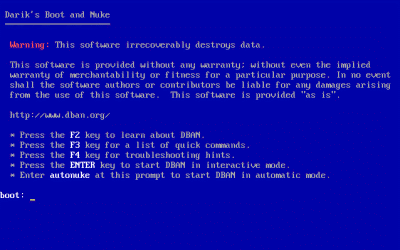
Once the computer boots into DBAN, you will be presented with a boot prompt. Hit enter to start DBAN in interactive mode.
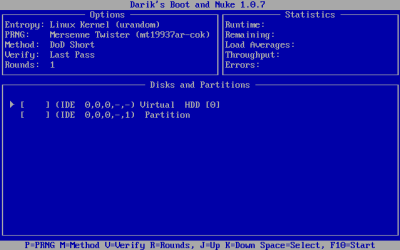
Once you are in interactive mode, you can choose the wipe method by hitting the M key. The default method is DoD Short which should be fine. You can select the drives and partitions you want to wipe by using your spacebar. Hit F10 to start the wipe.
Depending on your drive size, the wipe could take a couple of hours. Once it has finished then the drive is safe to dispose of.
If you have had experience with DBAN or any other disk wiping utilities please feel free to share.

9 Comments
tiptop
October 10, 2006Well I have not had any experience with the use of DBAN but I have made use of StompSoft’s Drive Washer (http://www.stompsoft.com/drivewasher.html) software which uses the U.S. Department of Defense 5220.22-M standard for disk-sanitization as well and is very easy to use. In fact this is the software that I generally recommend to those who ask me about what disk cleaning utility they should use when they are thinking about getting rid of their old computer.
khaled
July 27, 2007Hi Man
stop error, hang up , freeze, My PC suddenly stop
responding. iam runing xp (p4).
is there any way to make Windows report this error,
thanks.
amanda
October 17, 2007when i start my pc up it pops up and says something bout dlls have been lost or something
Neuro
April 2, 2013It sounds like the solution you described is for wiping a computer’s internal data storage. What if I have an external drive that I want to wipe?
Casey
April 3, 2013Hi Neuro,
Eraser works well for external drives. http://eraser.heidi.ie/
Jyoti
July 24, 2013Being a Mac user, I would like to suggest all Mac users as per my experience, they must use Stellar Drive ToolBox software. Mac Wipe utility helps to wipe data beyond the recovery and nobody can steal your data.
Neo Jensson
December 18, 2013Free software for over writing is ErAce. It does 1-100 over write cycles. It can be downloaded from erace.it or from sourceforge
Ali
October 13, 2016What if I use encryption to secure my data and just disposed of without the key? Is it a safe method or do I still need a utility to wipe my data permanently ?
a juicer
November 26, 2016Well I have not had any involvement with the utilization of DBAN yet I have made utilization of StompSoft’s Drive Washer programming which utilizes the U.S. Branch of Defense 5220.22-M standard for plate cleansing too and is anything but difficult to utilize. Actually this is the product that I by and large prescribe to the individuals who get some information about what circle cleaning utility they ought to utilize when they are thinking about disposing of their old PC.
Leave A Response